Workspaces: Because 50+ tabs is normal

Organize Like a Pro
Let’s be honest, having a million tabs open is just part of life. Whether you're juggling work, passion projects, or a deep dive into obscure Wikipedia pages, Workspaces help you keep it all under control. You are just 2 steps away from a whole new world:
✨ Step 1: Separate Your Browsing Like a Boss
Work, play, and "totally productive research" shouldn't mix.
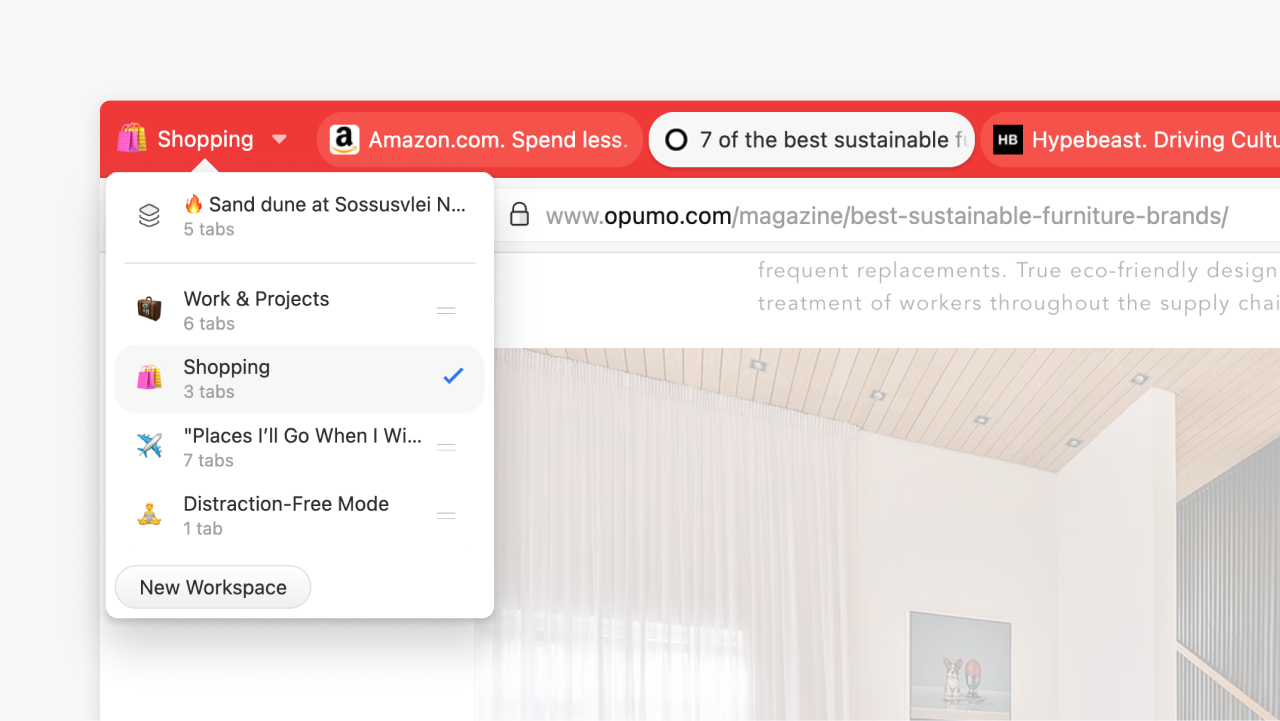
With Workspaces, you can organize your tabs into categories so your browser stays as focused as you are:
 | Work & Projects – Keep all your research and docs in one place |
| Shopping – Track those deals without mixing them with work tabs |
| "Places I’ll Go When I Win the Lottery" – Hey, a little dreaming never hurt |
| Distraction-Free Mode – Hide your guilty pleasure tabs from yourself |
✨ Step 2: Let Workspaces Work For You
Set it up once, and let Vivaldi do the rest.
With Workspace Rules, you can make sure that specific websites always open in the right Workspace. So your work emails never end up in your "weekend getaway" planning, and your deep Reddit dive stays far, far away from your work setup.
If your tab bar multiplies faster than rabbits, this is the feature you need. Workspaces keep everything organized, clean, and exactly where you left it.
Your future self will thank you for setting this up today.
Learn more about Workspaces.
Happy browsing!
 | Jón von Tetzchner |


Don't want emails like this anymore? No problem. You can unsubscribe here.
© Copyright Vivaldi Technologies